











Many AI music apps look impressive in a store listing, but the real test begins after installation. A useful app should move someone from a rough idea to a workable track and make revision practical. For students, video creators, hobby musicians, and people testing AI audio for the first time, a Song Maker App is worth keeping only when it supports a clear sequence: describe the idea, review the result, change the right details, and save the versions that matter. Instead of judging an app by the number of features shown on its page, users should test whether its main tools solve a real task on a phone.
Begin With the Task, Not the Feature List
Before comparing apps, decide what you actually want to make. A person creating background music for a short video has different needs from someone writing a full song with verses and a chorus. A student exploring song structure may value lyric controls. A podcaster may care more about a clean instrumental mood. A hobby musician may want to extend a promising section or separate parts of an existing track.
Write one test task in a single sentence. For example: “Create calm instrumental music for a travel video,” or “Turn my chorus lyrics into an upbeat pop draft.” This keeps you focused.
Use the same input for every app. Identical lyrics or a nearly identical prompt make the comparison more useful than unrelated songs.
Four Tests for a Practical Mobile Music App
A good evaluation does not require advanced audio knowledge. It requires a repeatable method and attention to the decisions the app lets you make.
- Test the Quality of the Input Controls
The app should let you describe more than a broad genre. Mood, voice direction, tempo, style, and song structure can all affect whether a result fits its purpose. The controls do not need to be complicated, but they should be understandable.
Try one simple prompt first. Then add a clearer mood and structure. If the second result follows the new direction, the controls are doing useful work. If every result sounds unrelated to the input, the app may be entertaining but difficult to direct.
For lyric-based creation, check whether you can use your own words and organize them into sections such as verse, chorus, and bridge. This matters when meaning is more important than surprise.
- Test Revision Without Starting Over
Generation is only the first step. A practical app should support refinement. Make one change after the first result: adjust the mood, rewrite the chorus, alter the tempo direction, or change the style. Then compare the new version with the original.
The important question is not whether the second track is objectively better. It is whether your change produced a result closer to the request. If you cannot connect an input decision to an audible difference, revision becomes guesswork.
Also check whether a promising track can be extended rather than abandoned. Extension is useful when the opening works but the song ends before the planned video, presentation, or listening use.
- Test Project Organization
Mobile creation can quickly become messy. Five prompts may produce many songs, and filenames alone may not explain why each version exists. A project library should help you return to the lyrics, prompt, and generated track that belong together.
Create two small projects with different purposes. Leave the app, return later, and see whether you can identify the stronger version without replaying everything. Good organization saves more time than a long menu of rarely used effects.
People who also use a web version should check whether account information and created work can stay connected across devices. This is especially helpful when an idea begins on a phone but needs review on a larger screen.
- Test the Supporting Audio Tools
Extra tools matter only when they fit your task. Vocal removal can support a karaoke-style version, while stem splitting separates parts for focused editing. Cover and add-track tools can support arrangement experiments, but they should not distract from song generation.
Choose one supporting tool and test it with a clear goal. Do not try every option in one session. You will learn more by completing one small task than by opening ten tools without judging the result.
A Simple Comparison Table
Use a table like this after testing two or three apps. Score each item with brief notes rather than relying on memory.
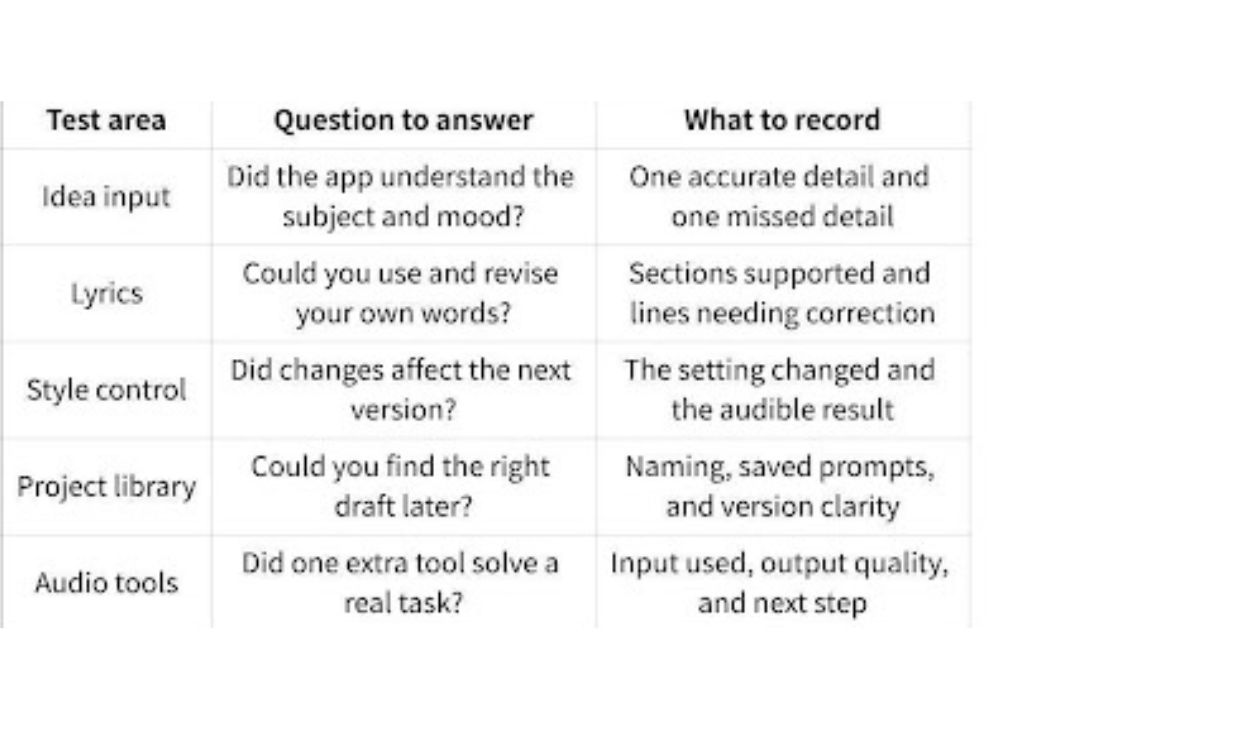
This method keeps the evaluation focused on use rather than marketing language. It also reveals which app fits your own work, even when another product has a longer feature list.
Where SongNow Fits in the Test
The SongNow App is the official AISong mobile app for iOS and Android. It supports song generation from text ideas or lyrics, with directions for genre, mood, voice, tempo, and structure. Users can keep prompts, lyrics, and generated songs in a mobile library. The app also includes tools for extending music, removing vocals, splitting stems, creating covers, and adding vocals or instrumentals to recordings.
For people who already use AISong on the web, signing in with the same Google account connects account information and created works across web and mobile. That makes SongNow especially relevant to a test involving device continuity.
The sensible way to evaluate it is not to use every tool immediately. Start with one complete task. Generate a song from a short prompt or your own lyrics, make one controlled revision, save the stronger result, and return to it later. Only then test an audio tool related to your project.
Common Testing Errors
The biggest error is comparing different prompts. A detailed cinematic request and a vague “make a good song” prompt do not create a fair test. Keep the inputs similar.
Another error is judging only the first ten seconds. A strong opening may lead to weak lyrics or an unsuitable structure. Listen through the complete result before deciding.
Users also confuse variety with control. An app may create many different songs, but that does not mean it follows instructions well. Control means a deliberate change in the input produces a useful change in the output.
Finally, do not ignore the destination. A track that sounds good through phone speakers may still be wrong for narration, gameplay, or a social clip. Test the song inside the project where it will be used.
Conclusion
Choosing a mobile AI music app becomes easier when you replace feature counting with a small practical test. Define one task, use the same input, review how well the app follows direction, and make a controlled revision. Then check whether the project remains organized and whether one supporting audio tool solves a real need. Song generation should not feel like repeatedly pressing a button and hoping for luck. The app should help you understand what to change and preserve the versions worth developing. Start with a song you genuinely need rather than a random demo prompt. That single project will reveal more about input control, revision, organization, and mobile usefulness than a long list of product claims.